

I was using and intensively testing Filen.io service to see if it’s worth for me to risk hundreds of dollars in lifetime Black Friday sale – allegedly their last lifetime sale (could be just marketing, we’ll see).
The last Filen.io lifetime sale announcement, and the related LowEndSpirit forum thread.
These are my notes – as a reminder and reference – and you are free to use them at your own leisure and risk. However, since this gets referred to as a review as well, I must also add this:
Status: Active
From April 2025 – ongoing
Unreliable sync: desktop app has file-deleting and endless loop bugs, while CLI is in beta and Rclone support is still in experimental phase (for years now).
At the time of writing, this is still experimental-stage product.
For my full review policy and testing approach, see:
BikeGremlin Review Policy
Problems and red flags
I’m neither selling or promoting Filen.io, nor trying to “bad-mouth” it. This is a placeholder for my convenient updating as I’m using the service, and that’s why it’s “on top” – nothing more, nothing less.
I would love to see the major problems fixed and use the service – otherwise I wouldn’t even bother with this. However, at the time of writing, I see so many amateurish red flags that it’s almost ridiculous.
Desktop client sync wipe bug
I have just had desktop client delete all the files from my Filen storage (“Filen cloud”). I have other backup copies, fortunately, but this is dangerous for anyone relying on Filen. What happened:
Windows 11 Pro, 64-bit – latest updates for Windows and Filen Windows desktop client app.
I am syncing a directory on my local HDD to Filen (say “D:\BKP”).
It is a one-way sync: from local HDD to cloud (haven’t configured two-way sync – fortunately in this case).
The app was running, sync was active (as opposed to being paused), and I deleted one subdirectory in my synced directory (say “D:\BKP\working-random-stuff\”) along with stuff in it.
Sync app deleted my entire cloud directory – not just the deleted subdirectory.
Fortunately, stuff outside of the “BKP” directory was not removed – and the files were moved to “trash” so could be “undeleted”.
I have no idea what kind of bug that was, but I’ve never experienced anything remotely similar with Rclone, or with Mega.nz desktop clients on Windows or Linux for years now. This has dented my confidence in Filen desktop client and I may keep using the service as cold storage but no sync, not for me… which greatly reduces the usefulness of this app.
Oh – full support tickets are still publicly visible!?!
Trying to re-do the sync gets the app running in a loop – deleting and reuploading same set of files over and over again. Clearing cache, or forcing sync from the app didn’t help.
For perspective: GUI desktop client is the only thing that makes this service even be considered when compared with using Hetzner + Rclone at under half the price if you can and want to do your own encryption and use CLI (unless you paid for a lifetime plan).
Removed/redacted incident & downtime reports
Update 2:
Reported and not fixed after months.
Update 1:
I have reported this problem as a bug on Filen’s discord (sub)channel for bug reports on 2025-11-01. Four days later, with no comment on my initial report, I posted the question in Filen’s official subreddit:
https://www.reddit.com/r/filen_io/comments/1oosbs5/why_are_filenio_incident_reports_being_redacted/
There, I got a reply that sounds reasonable (that missing past uptime reports is a bug, but not a high priority fix at the moment). So, I’m taking the stuff I wrote below in this section with a reserve so to speak – will see how this pans out in the future.
It is also worth noting that it took a public Reddit post to get a response – the Discord report was apparently ignored.
This is a red flag. May be just incompetence as opposed to malice, but it’s still bad, as it gives customers a false image of the service’s reliability.
- Redacted incident report page to show “no incidents reported”:
https://status.filen.io/incidents/2025-03/2025-05
– blocked from being saved on the wayback machine, so here is the screenshot. - Old original incident report of the major outage in April:
https://status.filen.io/incident/544157
This link now returns a 404, but this is the LES forum post where I discussed that outage when it happened:
https://lowendspirit.com/discussion/comment/211759/#Comment_211759
Public support ticket contents!?
Update 2:
Reported and not fixed after months.
For a privacy-oriented company, this part is a bit strange. I got an email related to my support ticket, with an URL that is publicly visible and contains everything I wrote in my ticket and its follow-up reply.
Any user should be able to confirm this by using their own support ticket link.
I posted this bug in the filen’s Discord “bug-reports” section on 2025-11-05.
Update 1:
Based on this reply (by Endur1el on Reddit) from Filen – linking to this reddit thread & reply, it seems Filen is well aware of this (and has been for a while now).
No security audit
Update:
Still not done, and makes it look worse when I consider the above-noted problems too.
Filen claims to be private and encrypted. While the client code is open source, considering the above-noted two problems, I am not convinced they could pass a security audit.
Filen company claims they can’t pay for many audits, so they are waiting to finish their “API 4.0” before paying for an audit (“once and for all” reasoning). That makes sense in general (small, starting company), but considering what I wrote above, I would recommend you encrypt your privacy-critical stuff before uploading (though, as far as I can tell, data itself is encrypted before the upload, on your PC/phone).
Broken URLs for the website pages
They posted some announcements to one link, then edited their website structure without setting proper redirects in place. Competent webmasters and even digital marketers don’t let such things take place. Example of a link that no longer works:
- Old link – that now redirects to the front page, which is nonsense:
https://blog.filen.io/status-update-february-2025/ - Current link to the same page:
https://filen.io/hub/status-update-february-2025/
Upload bugs and limits
I tried to upload a directory full of files:
161,764 files; 16,933 directories; 500 GB size
Both the web-browser interface and the Windows desktop app gave this error:
Maximum call stack size exceededAnother problem is the upload sometimes gets stuck when I try to upload several directories at a time. That is: If I select one directory (even if it has several subdirectories) it is OK (apart from the above-stated stack size limit), but if I select say “CLIENT-A” and “CLIENT-B” directories and try to drag & drop both – the upload seems to get hung up.
This makes it not very convenient – as opposed to using Rclone.
Update July. 2026: Filen now supports Rclone technically, but it is still buggy and I get exeptionally low speeds for downloads (sync-down) and many errors, so it is not reliable for backups (unlike Hetzner Storage Box which works flawlessly).
Poor and slow technical support
Update:
Yes, I can confirm this.
Take this with a bucket of salt because I’ve not experienced this personally:
Based on Filen’s Discord channel and Reddit “page”, technical support is slow to respond and won’t solve issues if they are complicated.
p=none DMARC policy
While no DMARC policy may be OK for testing, once you start working with customers, I think it is a lot safer to use strict (p=reject) DMARC policy because it makes spoofing emails a lot more difficult (and thust protects both your customers and your own domain’s reputation).
1. Why?
Main reasons why I’m considering this:
- One is none when it comes to backups.
- Privacy and encryption are a good thing.
- Modern hard disk drives are getting worse and worse (less reliable – helium-filled ones are basically rubbish compared to the “older tech.”).
- It is nice to not worry about subscription payments (card expiries, blocks, etc. – not just about saving money).
I do encrypt my Hetzner Storage Box backups using Rclone. However, configuring that on a new PC (or on a smartphone) takes some time.
Filen.io is fully encrypted, zero knowledge – with the convenience of using a browser to drag&drop, and even a phone app. That lets me have an extra backup copy, that I can download and upload to with some convenience.
Note 1
Rclone is awesome for my main backup procedure and the main downside of Filen.io is they don’t support Rclone (at the time of writing). So I’m still keeping my Hetzner Storage Box subscription.
Update, November 28th 2025:
A reader contacted me with this info (redacted by me to respect privacy):
Note that I still haven’t tested Rclone with Filen myself!
Also note that this is not beta, it is EXPERIMENTAL phase software – decide for yourself if you think it’s a good idea to use it for backups.
Your article mentioned a lack of rclone support for Filen. I just followed the (more or less) same route as you did, but Filen DOES support rclone. But rclone does not support Filen. So Filen released an rclone fork with the Filen support backed in:
https://github.com/FilenCloudDienste/filen-rclone
Try it out. It sure works great for me. In fact, this fork is the reason I bought their 2TB for life plan.
Update February 2026: Filen is now supported with Rclone – testing it.
Note 2
Filen.io is making a CLI – still in BETA (decide if you think it’s a good idea to use beta software for backups):
https://filen.io/products/cli
But still no Rclone support – so I see the simple app and browser drag&drop (both GUI) as the main advantage. Though it doesn’t hurt to have CLI as an option.
2. Can lifetime sales be trusted?
Usually not. I already wrote about lifetime offers in general. With a lifetime purchase, you are paying more upfront, and practically betting on that the company will:
- Remain in business.
- Honour their word (the lifetime service/product offered).
- Keep their quality (so it’s not practically useless even if it technically works).
Short rule: don’t risk more money than you are prepared to lose.
With that in mind, Filen.io seems like it could be OK – or at least not deliberately trying to take money and run. No major red flags for now. They don’t push lifetime sales aggressively and it could be entirely possible that they are profitable from the subscriptions.
I must note the common modern fake-it-till-you-make-it starting incompetence that practically every company is guilty of today (Zeitgeist) – Filen.io did fix some security bugs they started with and I don’t plan to spend much time or energy diving into that in this article.
3. My testing and experience
TL/DR: Initial testing and use, followed by more thorough testing.
3.0. MB/s vs Mb/s
I must add this here:
- Filen shows speed in MB/s (megabytes per second).
- Your ISP sells you speed (and speedtest.net shows it) in Mb/s (megabits per second).
- 1 MB/s = 8 Mb/s
In other words, it’s practical and honest that Filen reports the real, usable upload speed (unlike Pcloud to name one alternative).
But from a marketing perspective it “looks” “eight times slower,” because most folks are used to ISPs advertising in megabits. So a perfectly good 400 Mb/s upload from your ISP will show as “only” about 50 MB/s in Filen.
3.1. Start and initial experience
I started using Filen.io in April 2025, when I bought the smallest 100 GB lifetime plan.
I “tortured” that plan with uploads and downloads right away, using the browser client. After I was happy with how it performed in those tests, I started with regular everyday use, to see how it behaves.
Update, the very end of 2025: uploads are less reliable and get stuck/hung up indefinitely.
In regular use, I could see that the phone app is not very good for displaying uploaded photos – too slow, even on decent Internet speeds. Similar goes for syncing uploaded files to my Iphone: hit-and-miss. To compare with alternatives:
- Pcloud is a whole lot better for photo browsing and file sync, but it is not encrypted.
- Mega.nz is encrypted, works very well for file syncing (better than Pcloud), but sucks for photos or larger files (a bit too slow).
Filen.io is basically useful as file storage (to upload and download), but not much more.
3.2. Speed and stress testing
Before committing more money in a lifetime deal, I wanted to see how the platform behaves when larger uploads and downloads are made, more frequently. I also wanted to test the desktop application. So, I paid for one month of a 2 TB plan, to see how it fares.
Test setup
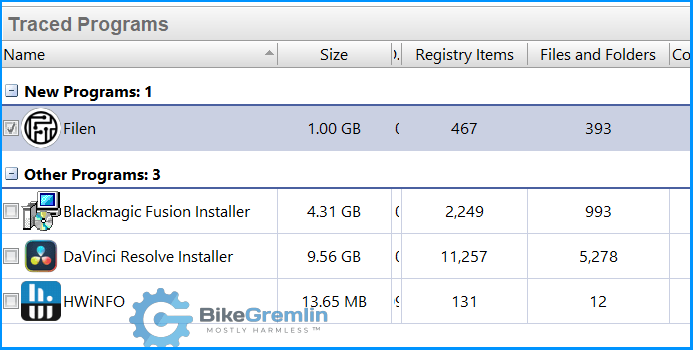
- My test PC configuration:
decently powerful so it is not a bottleneck (see the link above for details). - Internet connection speed:
50 MB/s (400 Mb/s) for both upload and download. - Many small files backup:
21 GB (2,300 directories and 38,000 files). - Few large files backup:
24.5 GB (7 directories and 33 files).
Test results
- Many small files – Browser drag & drop:
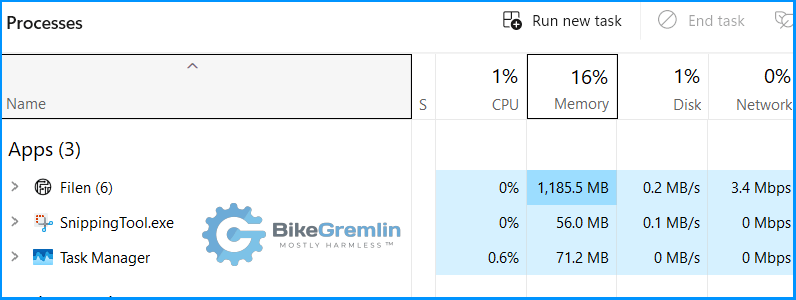
Under 4 hours with speeds of around 2 MB/s (~ 16 Mb/s). - Many small files – Windows desktop app drag & drop:
Under 3 hours, with speeds of around 3 MB/s (~ 24 Mb/s). - Few large files – browser drag & drop:
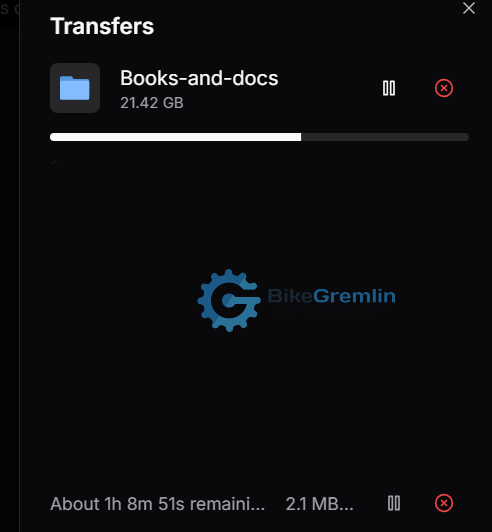
Under 15 minutes, with speeds of over 30 MB/s (~ 240 Mb/s). - Few large files – Windows desktop app drag & drop:
Under 20 minutes, with speeds of around 25 MB/s (~ 200 Mb/s)
NOTE:
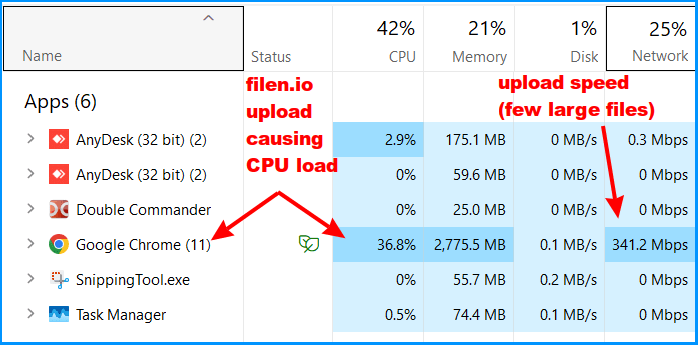
When uploading my Youtube video backup (over a thousand small txt and medium-sized video files), Filen app caused my 12-core CPU load to go over 40% at times (and was over 30% for most of the time). Here is a screenshot of using the browser (noticed the same loads with the desktop app):
Speed test discussion
For the many small files test:
Slow. Creating over 2,000 directories wasn’t faster with the desktop app, but upload of all those small files did go a bit faster. Note: the app doesn’t resume interrupted upload (if you close it or restart the PC), so it is nowhere near a decent FTP client or anything remotely similar. Unfortunately.
For the few large files test:
Fast. Ten times higher speeds compared to uploading many small files. Slightly slower speed via the desktop app compared to browser drag & drop?! Not sure what to make of it – hope other users can share their experience.
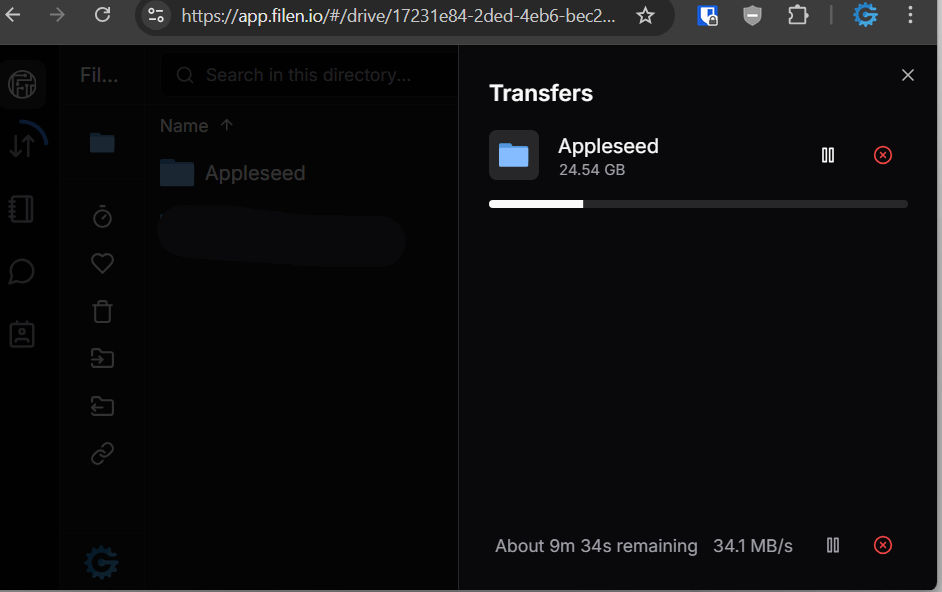
Test conclusion:
Encryption overhead does take its toll, so speeds drop extremely when you’re dealing with many small files (or directories for that matter). When files are large enough (like videos as opposed to text documents), I got higher speeds, up to my saturated realistic upload speed of around 44 MB/s (~ 350 Mb/s) for 1 GB file sizes.
So, to speed things up, you could pack small files into one .zip archive, even without any compression (so you don’t waste much time). The only problem is that you can’t “browse” the contents of the .zip archive on the cloud storage – you need to download it first.
Bottom line (late November 2025 update):
Encryption and decryption performance is still fast enough for practical large-file backups, and in everyday use I have not found encryption to be a bottleneck for typical backup workflows.
End of 2025 update: uploads are getting stuck – service has worsened.
3.3. Useful or useless?
Generally, Filen.io is not too bad. Not excellent, but not bad.
End of 2025 update: service is getting less stable and unreliable. That is the last thing I want for backups.
Let’s start with the good:
The upside is that the encryption and decryption is automated so even my wife can use it easily.
Read-only link sharing is very simple. I can share files and “browsable” directories with other Filen.io users (after adding them to my Filen.io contact list), or make public download links (with or without a password protection). This is a great convenience.
Note that most cloud storage services provide this feature.
Overview always accurately shows how much space each directory takes (along with all its subdirectories). This is uber-practical! 🙂
Desktop app sync behaviour
In addition to drag and drop uploads, the Filen desktop application supports simple one-way folder synchronisation. For backup workflows, this is significantly more convenient than using the web interface, especially for mirrored local -> cloud sync. I found it reliable in practice, with stable upload speeds and predictable behaviour (provided I’m syncing a backup directory/path, not writing anything to it!). The sync is not as robust as Rclone (no retries, no resume support), but for scheduled one-way backups of a static folder, it works well, and is very practical (removes what I’ve deleted locally, uploads what I’ve added – an exact mirror).
Update:
See the 2025-12-27 sync incident I had above.
Update, November 28th, 2025:
The app sync seems to be capable of recognizing when I move files or whole directories (as opposed to adding new ones and removing old ones), so it handles the move quickly and efficiently on the Filen’s server (unlike Rclone which always deletes and re-uploads stuff when I do move operations).
Also, see above (Note 1) about Rclone support update.
The bad:
However, browsing uploaded files is often slow – depending on the directory structure, it sometimes takes a 2-3 seconds to open a directory after I’ve double-clicked!
Another downside is that I need a good, fast, stable Internet connection to transfer (either upload or download) few very large or many smaller files. No (s)FTP support or Rclone, so that uploads/downloads can continue where they left off if interrupted. This leads me to a digression – LOL: 🙂
SFTP vs FTP(S)
- SFTP provides almost the same speed regardless of whether you are transferring one 1 GB file, or thousand 1 MB files (single file is always faster, but not by much here).
- FTPS (and unencrypted FTP) gives a similar performance for one (large) file, but it breaks and re-establishes connection for each consecutive file transfer. That is why it is a lot slower when you are transferring many smaller files.
4. Is the lifetime worth it for me?
Update, 2025-12-27:
Sync is unreliable – so storage is only possible with “manual” copy-pasting using the web browser and a fast Internet connection. Disappointing.
Here’s my thinking:
Before getting into cost comparisons, here’s what the 2024 Black Friday lifetime base prices (without discounts) looked like – these are probably the same prices expected for 2025 (that’s what I’m basing my calculations on):
- Pro I: 55 € (200 GB)
- Pro II: 130 € (500 GB)
- Pro III: 300 € (2 TB)
- Pro X: 1,400 € (10 TB)
According to the announcement, the lifetime prices will be “without discounts”.
- Last year’s Black Friday sale price was around 300 € for the 2 TB plan.
- My backups for the past three decades are about 1.5 TB, and the stuff I store for family is another 1 TB, so 2.5 TB in total.
- For those storage needs, I’d need to buy two 2 TB lifetime plans. This would give me some room for future backups (probably until the service or I die – LOL).
Filen.io storage plans stack (aggregate) – both the subscription and lifetime plans.
That is around 600 € right away.
Hetzner Storage Box gives me a whole 5 TB of storage for around 11 € per month – in my case that is under 8 € per month extra compared to what I must pay as a minimum for my server backup storage (the 1 TB plan).
That means over six years in installments to break even. Sure, prices will go up year after year, but hopefully so will my pay (at least to a degree).
Will Filen.io stay in business for six more years or longer? Will the service quality be good. No one knows, and the risk is very high.
However, the advantage of automated compression and drag&drop use is what sets Filen.io apart from Hetzner – that is the main (if not the only real) advantage. Another advantage is that it’s a second cloud backup – as an extra redundancy.
Also worth noting, Filen.io monthly prices are over 9 € per month for 2 TB (so 18 € per month for two 2 TB plans for my backups). If I put that into years, compared to lifetime prices I’m expecting to see, this is under 3 years to break even if I pay a lifetime.
It is risky. I’m still not 100% sure whether to buy the lifetime(s) or not. As you can see from the very start of this article, privacy is a concern, still, to a degree. Still, I wanted to publish what I got so far, and I hope this will help other people too. 🙂
Update, late November 2025:
In practical terms, I now split my usage across Pcloud (un-encrypted phone photos and video offloading), Filen (encrypted cloud backup and sync), and Hetzner (Rclone-encrypted main backup). Filen fits nicely in the middle: more convenient than Rclone, and far more usable for encrypted uploads than pCloud Crypto. This division of roles reduces risks and avoids leaning on any one provider’s weaknesses.
Update, November 24th 2025:
I’ve decided to risk it with two 2TB lifetime plans (at 280 € each). We will know in a few years if that was a foolish decision (cancelled my monthly subscription).

4.1. What about the monthly subscription prices?
Update:
With the unreliable sync (desktop client bugs, rclone and cli in experimental or beta phase), the usefulness of this service is dubious. Drag n drop via browser can work if you don’t have too many small files, don’t have very large files, and have a fast and stable Internet connection. This is the opposite of ideal for a backup service.
Considering that the zero-knowledge encryption comes right out of the box (without being uselessly slow like Pcloud’s encryption is), the price is fair.
Roughly double of Hetzner Storage Box price, but Hetzner is probably by far the cheapest option that is still any good, and the low price is only for the simplest FTP storage boxes – everything else costs a lot more, even with Hetzner.
So, at 2TB costing less than 10 €, charged monthly (not for the full year in advance), I am quite happy with the service.
Still considering to get a lifetime plan on this Black Friday, LOL. 🙂
5. Rclone support and setup
I already wrote about how to install Rclone and configure sync – and I’ve been using that with Hetzner Storage Box for a while with great results. Rclone version 1.73.0 introduced support for Filen. To get it working, you must first run Filen CLI to get your API key – and then use that key (and your password) to mount your Filen storage. Here’s how:
5.1. Filen CLI (beta) install
This is beta-software, but in this case we’ll use it just to get the API key, and then use Rclone for sync. So we first download the CLI, login (with the Filen email and password), and then run the export-api-key command.
Release at the time of writing (v.0.0.36):
https://github.com/FilenCloudDienste/filen-cli/releases/tag/v0.0.36
Download it, put the downloaded file somewhere you have a defined Windows path (or enter the downloaded file directory in your command prompt).
I have renamed the file to “filen-cli.exe” and that’s what I’ll be using for this example.
- filen-cli ↵
- Enter your FIlen.io username (email) and password.
- Keep me logged in: y ↵
- type:
export-api-key↵ - Proceed? y ↵
Now you’ll see your API key – copy/paste it to your password manager and press CTRL+C is to exit.
5.2. Filen Rclone setup
Install Rclone as explained here:
https://io.bikegremlin.com/38747/rclone-installation-and-configuration-step-by-step/#preparation-and-software
Now, in your command prompt, type rclone config ↵
- n -> create new remote
- Name: “filenbox”
- Storage (type): “Filen” (20)
- Email of your Filen account: [email protected]
- Password of your Filen account (Yes, type in my own password): y
- Enter the password: xyzxxx
- Option API Key.
An API Key for your Filen account
Get this using the Filen CLI export-api-key command
You can download the Filen CLI from https://github.com/FilenCloudDienste/filen-cli
Choose an alternative below.
y) Yes, type in my own password
g) Generate random password
y/g> y - Enter & confirm the password: your-filen-API-key-goes-here
- Edit advanced config?: n
- Configuration complete: y -> q (Quit config)
That’s it, now you can run the commands. 🙂
5.3. Rclone commands
- Copy from a local directory to a Filen directory:
rclone copy "C:\bekap" filenbox:bekapb --progress --transfers=4 --checkers=8 --fast-list --log-file="C:\LOGS\rclone\frclone-sync.log" --log-level=INFO - Sync from a local direrctory to a Filen directory (sync up):
rclone sync "C:\bekap" filenbox:bekapb --progress --transfers=4 --checkers=8 --fast-list --log-file="C:\LOGS\rclone\frclone-sync.log" --log-level=INFO - Sync from a Filen directory to a local directory (sync down):
rclone sync filenbox:bekapb "C:\bekap" --progress --transfers=4 --checkers=8 --fast-list --log-file="C:\LOGS\rclone\frclone-sync.log" --log-level=INFO - Mount the Filen drive (“
--read-only“):rclone mount filenbox: Q: --vfs-cache-mode full --read-only
5.4. Rclone speed test
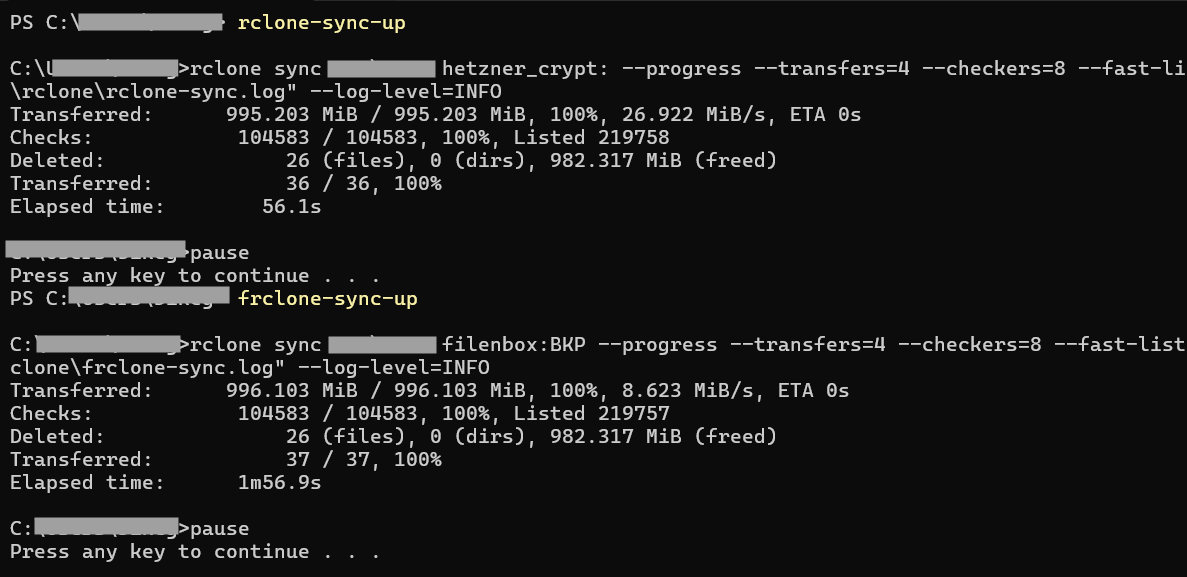
The numbers speak for themselves – Filen is quite slow compared to the cheap Hetzner Storage Box:
| Provider | Data Transferred | Speed | Elapsed Time |
| Hetzner Storage Box | ~995 MiB | 26.922 MiB/s | 56.1s |
| Filen | ~996 MiB | 8.623 MiB/s | 1m 56.9s |
Sources
- Filen.io infrastructure investments announcement from February 2025:
https://filen.io/hub/status-update-february-2025/ - Filen’s roadmap:
https://filen.io/hub/roadmap/
Last updated:
Originally published:
