

A.K.A. my configuration, Gizmo PC. 🙂
What can you expect here? Some general PC component choice info. I’ll use my own PC build as a skeleton, while explaining the choices, pros and cons, and trying to keep it up-to-date with any noteworthy newer stuff.
This article is for my own reference (why I write articles like this), and for those who want my advice – there’s no more honest recommendation than what I actually use and pay for.
Since I’m publishing this online: these are my own experiences and opinions, based on what I’ve learned and tested. Nothing more, nothing less.
Articles in this series:
- My Hosting stack
Infrastructure – domain registration, DNS, website and email hosting. - My (backups) Storage stack
Storage – physical and cloud. - My OS & System Software stack
Computer-running – OS, drivers, security, diagnostics, and utilities. - My Application Software stack
Computer-using – writing, editing, playing media, and troubleshooting. - My Wordpress stack
Themes and plugins I use for making sites. - My Zettelkasten System (BikeGremlin Deathnotes)
Knowledge management system (“2nd brain”) - My PC Component Selection
Components I chose for my PC – and why
Introduction
All electronic appliances run on white smoke: when the white smoke escapes, the appliance stops working!
Rudy, my colleague and the best computer technician in the known universe.
I’ve got decades of experience working as an IT professional, fixing and troubleshooting computers, and have built dozens of PCs for many friends, colleagues, and for myself over that period. So, I am nowhere nearly as knowledgeable and experienced as your favourite tech. influencer, youtuber or even average redditor. Thus, consider this just my personal notes, sharing my thoughts, experience and what’s worked for me. This is by no means a guide, tutorial, or telling you what to buy and how to build your PC.
I link to articles discussing and explaining my choices further.
This computer is mostly used for reading, writing, video editing, a minimum amount of coding and some gaming.
Power
UPS: APC Back-UPS 1600VA BX1600MI-GR
purchased 2022-10-30
- Pros: Offers ample backup power, allowing me to safely shut down the system during power outages and protecting my hardware from surges. This is invaluable for safeguarding my work and investment.
- Cons: UPS units can be bulky and take up floor space. They also require battery replacements every few years, but this is a minor trade-off for the protection provided.
APC UPS battery replacement procedure
Power Supply: CORSAIR RMx Series RM1000x 1000W
purchased 2022-10-30
- Pros: High wattage gives headroom for future upgrades; efficient and reliable with a good reputation.
- Cons: None significant, though a lower wattage could suffice for my current build, this still runs reliably and cooly.
Core platform (Motherboard, CPU, and Graphics)
Motherboard: ASUS TUF GAMING B550-PLUS WIFI II
purchased 2022-10-30
- Pros: Good build quality with solid VRMs, ensuring stable power delivery for the Ryzen 9 5900X; Wi-Fi support is useful for flexible connectivity.
- Cons: Lacks PCIe 4.0 on multiple slots, which could limit future upgrades like additional high-speed SSDs, more SATA HDDs or expansion cards.
RAM: Kingston Fury 64GB DDR4 3600MHz
purchased 2022-10-30
- Pros: High capacity and good speed, which is great for multitasking, video editing, and other memory-intensive tasks.
- Cons: not the fastest RAM that exists, especially at the time of updating this.
RAM 101 – explained;
RAM latency and timing explained;
DDR5 vs DDR4 RAM: Jump or Wait?
CPU: AMD Ryzen 9 5900X
purchased 2022-10-30
- Pros: Excellent multi-threaded performance; ideal for video editing, multitasking, and productivity. Efficient power consumption relative to its performance. 12-cores (2×6 core architecture) put in the same area as the beefier 16-core (2×8) model. This assures great cooling without much noise!
- Cons: Slightly behind Intel’s (and even AMD’s for that matter) newer generations in single-core performance, which could impact tasks highly dependent on single-thread performance (still, far from sluggish).
CPU 101 – explained;
Why newer AMD 7000 and 9000 series CPUs are still less than ideal for extended loads
CPU Cooler: NOCTUA NH-D15S
purchased 2022-10-30
- Pros: Known for outstanding cooling performance and low noise levels; highly reliable – and ugly, brown.
- Cons: Its large size may restrict RAM clearance with some configurations, but this isn’t an issue with my current setup.
Graphics (video) Card: SAPPHIRE Radeon RX 6800 16GB NITRO+
purchased 2022-10-30
- Pros: Excellent for high-resolution gaming and workloads that benefit from a high VRAM capacity, like video editing and rendering. Sapphire’s cooling is also very efficient and quiet. Relatively low power consumption and runs pretty cool (compared to RX 6800 XT and “higher end” models).
Sapphire Nitro+ is as good as it gets in terms of component quality for AMD video cards – but not with latest models. - Cons: Lacks some hardware-accelerated features available in NVIDIA graphics cards (such as certain CUDA-specific tasks and better DaVinci Resolve compatibility – also affects Insta360 X5 camera 8K editing).
It’s a graphics (video) card, not a GPU!
USB-C + USB-A card: StarTech. com PEXUSB312A2C2V
purchased 2026-03-04
StarTech. com USB-C PCIe Card with 4 Ports – 10 Gbps USB PCI Express Expansion Card with 2 Controllers – 2 x USB-C & 2 x USB-A Ports – USB 3.1 Interface Card – Full Profile (PEXUSB312A2C2V)
- Pros: two independent ASMedia 3142 chipsets – both run at a full 10Gbps (20 Gbps total) – plus ASM2806 PCIe Switch.
ASMedia 3142 is the most stable 10Gbps chipset available.
Onboard SATA power connector – provides up to 15W to the USB-C ports.
PCIe 3.0 x4 (or higher).
Full Profile size card – fits comfortably in my case & cooling fans. - Cons: price, $160.
The manufacturer’s product page;
My Amazon.de affiliate link (where I bought it from)
Storage
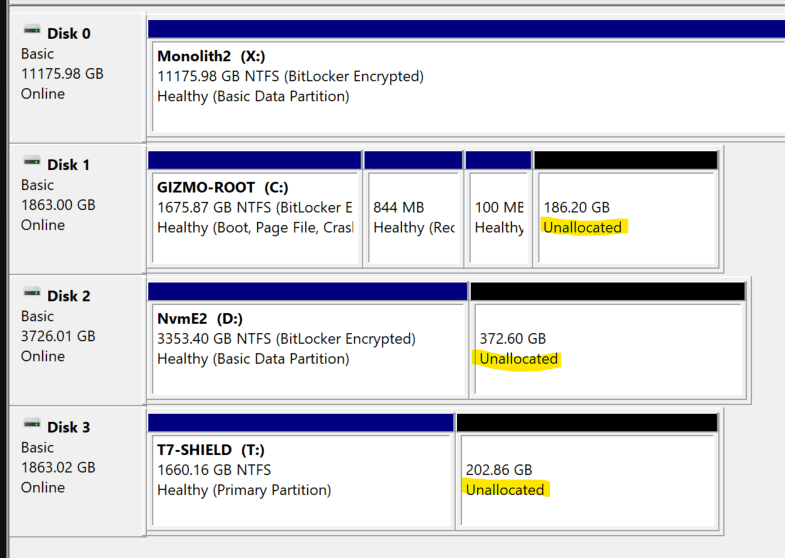
Primary (system) drive – NVMe SSD: SAMSUNG 2TB 970 EVO Plus
purchased 2022-10-30
- Pros: High read/write speeds and known for durability. Samsung’s SSD (both SATA and M.2 NVMe) drives are among the best for reliability.
- Cons: PCIe 3.0 standard, which, while fast, isn’t as fast as PCIe 4.0 drives like the Samsung 990 PRO.
Working drive – NVMe SSD: Samsung 990 PRO NVMe SSD (4TB)
purchased 2024-10-20
- Pros: Ultra-fast PCIe 4.0 speeds are excellent for high-speed data tasks, reducing load times for applications and large video files in editing.
- Cons: Relatively costly for PCIe 4.0 SSDs, though its performance and durability make it a good investment.
With my current motherboard, the PCIe 4.0 speed capable M.2 slot is taken by the PCIe 3 Samsung 970 EVO Plus, while the second (and last) M.2 slot supports only PCIe 3.0 – so I’m not getting the max possible performance out of the 990 PRO (still, it is more than fast enough for my needs, and I don’t feel like swapping the drives).
PCIe 4.0 vs. PCIe 5.0: The Great Leap Forward or Just a Hop?
Storage drive – HDD: Seagate IronWolf Pro HDD (12TB)
purchased 2024-02-20
- Pros: Excellent storage capacity for large files, like video projects or backup archives, with robust durability and reliability. The IronWolf Pro series is specifically built for heavy-duty usage.
- Cons: HDDs are slower than SSDs, so this drive is best suited for archiving rather than active editing. If speed is needed, using this drive for cold storage is ideal while keeping active projects on the faster NVMe SSDs.
Storage at work: Western Digital 12TB 3.5″ Sata III Ultrastar (HUH721212ALE601) hard disk
purchased 2025-11-03
- Pros: cheap, built to last (hopefully, we shall see).
- Cons: noisy.
Case & Cooling fans
Case: COOLERMASTER MasterCase H500P Mesh
purchased 2022-10-30
- Pros: Great airflow and plenty of space for large video cards and future upgrades. The design is optimized for air cooling and supports good cable management. Great quality built in fans!
- Cons: The mesh design can be slightly noisier as more airflow brings in sound from internal components (with remotely decent fans it’s not a problem in the least).
Mounts for SATA SSDs on the front section (near the glass) are too close to the motherboard!
Peripherals
Mouse: ASUS ROG Gladius III Mouse
purchased 2024-10-20
- Pros: Comfortable design, high DPI sensor, and durable build. Excellent for both productivity and gaming.
- Cons: The mouse is asymmetrical, which may be less comfortable for left-handed users. May be pricier than other options without a discount, but I got a very good deal on it.
Keyboard: Keychron Q6 Mechanical Keyboard (Gateron G Pro Blue)
purchased 2022-10-30
- Pros: Known for durability and customization, the Q6 is built like a tank and offers a premium typing experience. The Gateron Blue switches provide tactile and audio feedback, which can be satisfying for typing and coding.
- Cons: The Blue switches are noisy, which can be disruptive in quiet environments. If silence is important, a switch to a quieter model may be beneficial.
Gateron switches break down relatively quickly (I replace one or two every quarter).
Keyboard palm rest: Keychron Wooden Palm Rests (Q6 / V6 / K10 Pro, and K10 / C2)
purchased 2022-10-30
- Pros: These wooden palm rests provide ergonomic support, reducing strain during extended typing sessions. The natural wood adds an aesthetic touch that pairs well with a high-quality keyboard setup.
- Cons: Wooden palm rests can be slightly rigid compared to gel or foam, though that’s mostly a matter of personal preference. They may require occasional maintenance (like light oiling) to keep them in top shape. The regular retail price is a ripoff.
Keyboard at work: Keychron K10 Wireless Mechanical Keyboard (Gateron G Pro Brown)
purchased 2022-10-30
- Pros: The K10 offers wireless flexibility with decent battery life and tactile Brown switches that are quieter than the Blue switches. This makes it more versatile for both home and office use.
- Cons: Wireless connectivity could be a potential downside if you prefer a zero-latency, wired experience. Battery life may also be an occasional concern if used heavily, and some models were known for battery swelling.
No print screen button on the full-sized keyboard!?!
This is my office keyboard and it’s quite good.
Speakers: Logitech Z200 2.0 Speakers
purchased 2022-10-30
- Pros: Good value for money, with decent sound quality for a simple 2.0 setup, especially for general audio or casual gaming. They don’t take up much space and are reliable for desktop use.
- Cons: These speakers aren’t designed for high-fidelity audio, so if you’re looking for exceptional sound quality, an upgrade may be worth considering.
Headphones: Sony MDR-7506 headphones
purchased 2023-03-14
My review:
https://www.youtube.com/watch?v=kV3aFPWw90E
Detailed specifications:
- Headphone Type: Dynamic, closed
- Magnet Type: Neodymium
- Driver Size: 40.0 mm
- Frequency Response: 10-20kHz
- Impedance: 63 Ohms
- Sensitivity: 106 dB/W/m
- Power Handling: 1,000mW
- Plug Type: Gold, Stereo Unimatch plug 1/4″ and 3.5 mm (about 1/8″ – give me the metric system, or give me death! 🙂 )
- Cord Length: 9.8 ft (two dwarves, 99 mushrooms, or 3 metres) – non replaceable
- Weight: 8.1 oz (230 grams)
Monitor: LG UltraGear Gaming Monitor 34GN850P
purchased 2024-11-15
In November 2024, I bought my first ultrawide adaptive-sync monitor:
LG UltraGear Gaming Monitor 34GN850P (Amazon.de affiliate link)
- The ultrawide 3440×1440 resolution is very practical for working (I find it more practical than using two monitors).
- 144 Hz Free-sync (“G-sync compatible”, adaptive-sync) refresh rate does make even scrolling smoother (I still mostly use it for reading, writing, and video editing).
- Image is clear and nice on the eyes – this was my biggest concern. Less glare than the below-described Dell, with similar image clarity (to my surprise).
Factory stand sucks, really bad. I mounted the monitor on a wall mount, so it stays put (any kind of sway is noticeable on a monitor this big and wide).
Monitor at work: Dell UltraSharp 27 Monitor – U2722D
- Pros: 1440p resolution and excellent color accuracy, ideal for productivity and color-sensitive tasks like video editing. Ergonomic adjustments make it comfortable for prolonged use.**
- Cons: 60Hz refresh rate isn’t ideal for high-frame-rate gaming, and brightness may be slightly lower than advertised in well-lit rooms. Glare prone.
Overall Summary
This setup was carefully selected for performance, ergonomics, and productivity.
Strengths
- Performance: The build is powerful and well-suited for multitasking, productivity, video editing, and gaming – thought the choice of AMD graphics card does limit some video editing performance.
- Storage: I’ve balanced high-speed SSDs for active work and a large HDD for long-term storage, covering all storage needs.
- Ergonomics: The choice of monitor, keyboard, mouse, and palm rest supports comfortable, prolonged use.
- Stability and upgrades: The PSU and case offer room for future upgrades, while the UPS protects against power disturbances.
Potential Limitations
- PCIe and SATA storage limitations: The motherboard only partially supports PCIe 4.0, and newer systems now offer PCIe 5.0, but this isn’t critical unless one plans high-bandwidth upgrades.
- Speakers: If audio quality becomes a priority, upgrading the speakers could be worthwhile.
Buying and sourcing
- Prices in Hungary:
https://www.arukereso.hu - CLOSED PSU calculator (shut down in 2025):
https://outervision.com/power-supply-calculator - Seasonic PSU calculator:
https://seasonic.com/wattage-calculator/
Conclusion
This setup is optimized for versatility and efficiency across a variety of tasks, from creative work to casual gaming. It’s a balanced and well-rounded configuration that should meet my needs for years to come.
Last updated:
Originally published:
