
I like shared (and reseller) hosting for several reasons (see Wordpress hosting for more details). I want to have one address book and calendar synced accross different computers and smartphones in different locations (home, work, workshop etc.). And I want it to be self-hosted, so I am not at the mercy of a huge corporation (like Google or Apple). So here we are, the open-source Nextcloud looks like the least bad option for achieving that goal. 🙂
In January 2026, Nextcloud broke Contacts, Floccus bookmars sync and who knows what else after a minor patch update (to 32.0.5 version). That is unnaceptable. In practice, this is a clunky software that tries to do a lot of stuff, but doesn’t seem very reliable or robust. I’m calling it a day regarding self-hosted Nextcloud.
Apparently, the safe bet is to stay on the previous patched major version. I have decided to use managed Nextcloud (my email provider, MXroute, offers it for customers without extra costs which is awesome).
A very educational thread on Nextcloud forum where a user reached the same conclusion as I have (and also chose Hetzner Storage Share managed Nextcloud service):
https://help.nextcloud.com/t/about-to-give-up-on-nextcloud-ios-client-broken-again/230190
For the “I only skimmed it” folks:
This install is for personal use on shared hosting – may not be ideal for heavy collaboration or large file storage.
Note 1:
For normal people, it may be wiser to just pay about $5 per month for Hetzner Nextcloud management and about $5 more for off-site backups of it.
Note 2:
Nextcloud markets to “small teams” but (see section 7 Updating Nextcloud for details):
- Their updater assumes VPS-level I/O.
- Their CDN can’t handle release surges.
- Their migration scripts aren’t restart-safe.
Placed this in the storage section even though I mainly use it for address book and calendar syncing and backups.
1. Hosting account setup
I created a Cpanel account for the install – making it a separate one.
Created a database and a database user (and gave the user permissions for the database).
This part is similar to manually installing Wordpress.
I had to create a “ncdata” directory in my Cpanel user’s root (not under the “public_html”).
PHP modules and setup for Nextcloud:
https://docs.nextcloud.com/server/29/admin_manual/installation/php_configuration.html
2. Installation
Nextcloud installation download link:
https://download.nextcloud.com/server/releases/latest.zip
Upload it, extract in the public_html root or the directory of your choice, and go there from a browser.
Then you get to enter your admin username and password, and the path to your data directory.
Select MySQL/MariaDB option to add database, user, and password.
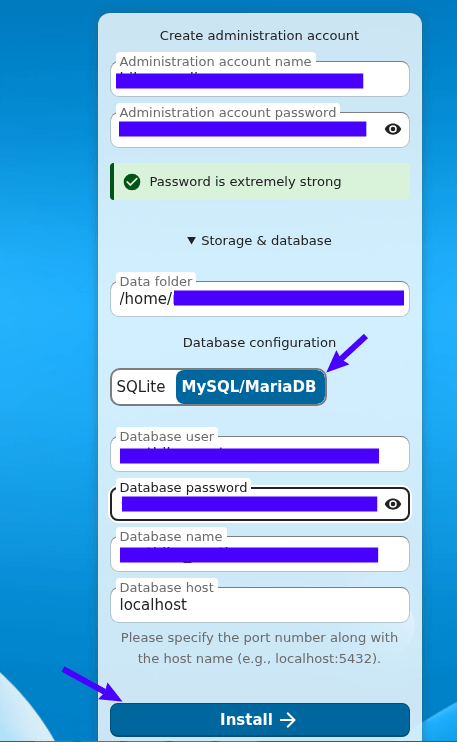
It then offers to install a bunch of pointless, heavy apps – I went with only Calendar, Contacts, and Notes:

3. Troubleshooting
So, after the installation, I got a bunch of warnings end errors when I went to the Administration tab of my Nextcloud account.

3.1. AppAPI deploy daemon
ERROR – Ignored
AppAPI deploy daemon
AppAPI default deploy daemon is not set. Please register a default deploy daemon in the settings to install External Apps (Ex-Apps).Code language: JavaScript (javascript)
It’s a new optional system for managing “External Apps” (AppAPI). I’m not using that, and on shared hosting I can’t run a daemon anyway.
3.2. Code integrity
WARNING – Fixed
Code integrity
Some files have not passed the integrity check. List of invalid files… Rescan…Code language: PHP (php)
Had to remove the extra files left over after the installation (the uploaded .zip file, and the empty “nextcloud” directory left after I’ve unpacked it and moved the files to where I wanted the Nextcloud to run from).
3.3. Maintenance window start
WARNING – Fixed
Maintenance window start
Server has no maintenance window start time configured. This means resource intensive daily background jobs will also be executed during your main usage time. We recommend to set it to a time of low usage, so users are less impacted by the load caused from these heavy tasks.Code language: JavaScript (javascript)
Google helped, for a change:
https://help.nextcloud.com/t/server-has-no-maintenance-window-start-time-configured/180480/11
I needed to add this line to the “nextcloud-directory/config/config.php”:
  // BEGIN BikeGremlin maintenance windows edit
  'maintenance_window_start' => 1,
  // END BikeGremlin maintenance windows editCode language: PHP (php)
That looks like this:
BLA BLA - BUNCH OF OTHER STUFF, then the last line, and then you add your stuff:

  'installed' => true,
   // BEGIN BikeGremlin maintenance windows edit
  'maintenance_window_start' => 1,
  // END BikeGremlin maintenance windows edit
);Code language: PHP (php)
3.4. Mimetype migrations available
WARNING – Fixed
Mimetype migrations available
One or more mimetype migrations are available. Occasionally new mimetypes are added to better handle certain file types. Migrating the mimetypes take a long time on larger instances so this is not done automatically during upgrades. Use the command `occ maintenance:repair --include-expensive` to perform the migrations.Code language: JavaScript (javascript)
Telling me that you I rebuild file-type metadata.
On shared hosting, you can’t run the occ directly unless your host allows command-line PHP. My uber-cool hosting provider does provide SSH – yey! 🙂 So, I could SSH connect and then run:
php -d memory_limit=1G -f /home/my-cpanel-username/public_html/my-nextcloud-install-path/occ maintenance:repair --include-expensiveCode language: PHP (php)
3.5. HTTP headers
WARNING – Ignored
HTTP headers
Some headers are not set correctly on your instance - The `Strict-Transport-Security` HTTP header is not set (should be at least `15552000` seconds). For enhanced security, it is recommended to enable HSTS.Code language: JavaScript (javascript)
HSTS makes more problems than it solves. Still. Not going to implement this.
3.6. Database missing indices – AFTER each update, probably
WARNING – Fixed
Database missing indices
Detected some missing optional indices. Occasionally new indices are added (by Nextcloud or installed applications) to improve database performance. Adding indices can sometimes take awhile and temporarily hurt performance so this is not done automatically during upgrades. Once the indices are added, queries to those tables should be faster. Use the command `occ db:add-missing-indices` to add them. Missing indices: "properties_name_path_user" in table "properties"Code language: JavaScript (javascript)
The DB could be a bit faster if an extra index were added. SSH, run:
php -f /home/my-cpanel-username/public_html/my-nextcloud-install-path/occ db:add-missing-indices
3.7. PHP opcache
WARNING – Not fixed after all
PHP opcache
The PHP OPcache module is not properly configured. The OPcache interned strings buffer is nearly full. To assure that repeating strings can be effectively cached, it is recommended to apply "opcache.interned_strings_buffer" to your PHP configuration with a value higher than "8"..Code language: JavaScript (javascript)
This would require my provider to allow the following edit:
opcache.interned_strings_buffer = 16
opcache.memory_consumption = 128
opcache.max_accelerated_files = 10000
It is not of a huge importance, but it could help in case I open many files and similar.
Not sure if it’s a good idea in a shared hosting environment and I don’t see it as making any problems for now. Still, provider fixed this via .htaccess directives as they recommend in their knowledge base:
https://www.mddhosting.com/support/knowledgebase/88/Setting-PHP-Environment-Variables.html
Note:
The first line below was later commented out – for details, see below: 4.1. Zend OPcache can’t be temporary enabled.
#php_value opcache.enable 1
php_value opcache.memory_consumption 192
php_value opcache.interned_strings_buffer 16
php_value opcache.max_accelerated_files 100000
php_value opcache.revalidate_freq 60
php_value opcache.validate_timestamps 1
php_value opcache.save_comments 1Code language: CSS (css)
After that, the error stopped, but I get the warning again. Sigh.
3.8. Transactional File Locking
INFO – Fixed
Transactional File Locking
The database is used for transactional file locking. To enhance performance, please configure memcache, if available.
My awesome provider does provide secure Redis instance isolated for each shared/reseller hosting account, but how do I configure Nextcloud to use it?
The first thing I did was enable the “apcu” PHP extension in the Cpanel. Duh! 🙂
https://docs.nextcloud.com/server/21/admin_manual/configuration_server/caching_configuration.html
Then I edited the “nextcloud-directory/config/config.php”:
  // BEGIN BikeGremlin cache edit
  'memcache.local' => '\OC\Memcache\APCu',
  'memcache.locking' => '\OC\Memcache\Redis',
  'memcache.distributed' => '\OC\Memcache\Redis',
  'redis' => [
    'host' => '/home/my-cpanel-username/redis.sock',
    'port' => 0,
  ],
  // END BikeGremlin cache editCode language: PHP (php)
3.9. Default phone region
INFO – Fixed
Default phone region
Your installation has no default phone region set. This is required to validate phone numbers in the profile settings without a country code. To allow numbers without a country code, please add "default_phone_region" with the respective ISO 3166-1 code of the region to your config file.Code language: PHP (php)
I edited the “nextcloud-directory/config/config.php”:
  // BEGIN BikeGremlin phone region code
  'default_phone_region' => 'RS',
  // END BikeGremlin phone region codeCode language: PHP (php)
3.10. Email test
INFO – Fixed
Email test
You have not set or verified your email server configuration, yet. Please head over to the "Basic settings" in order to set them. Afterwards, use the "Send email" button below the form to verify your settings.Code language: JavaScript (javascript)
I have configured email to use my MXroute SMTP account.
3.11. PHP modules
INFO – Fixed
PHP modules
This instance is missing some recommended PHP modules. For improved performance and better compatibility it is highly recommended to install them: - gmp required for SFTP storage and recommended for WebAuthn performance - sysvsem
It lets me know which PHP extensions to enable.
4. Error logs (after the initial installation)
After having connected and synced my PCs and phone with contacts and calendar, I saw some error logs. Logs are stored at:
Administration settings -> Logging
There are several warnings and even a couple of errors.
Based on Google and tech. support feedback, those are nothing to worry about.
Also, it’s a fact that it all works fine – all the connected and synced PCs and my phone, so I suppose it’s all OK.
Will keep an eye on it in case of any problems.
Aaaand, here we go:
4.1. Zend OPcache can’t be temporary enabled
ERROR
Zend OPcache can't be temporary enabled (it may be only disabled till the end of request) at Unknown#0

{
  "reqId": "[redacted]",
  "level": 3,
  "time": "2025-10-18T05:14:44+00:00",
  "remoteAddr": "[redacted]",
  "user": "[redacted]",
  "app": "PHP",
  "method": "GET",
  "url": "/index.php/apps/logreader/api/log?offset=138&query=",
  "message": "Zend OPcache can't be temporary enabled (it may be only disabled till the end of request) at Unknown#0",
  "userAgent": "Mozilla/5.0 (Windows NT 10.0; Win64; x64) AppleWebKit/537.36 (KHTML, like Gecko) Chrome/141.0.0.0 Safari/537.36",
  "version": "32.0.0.13",
  "data": {
    "app": "PHP"
  },
  "id": "[redacted]"
}Code language: PHP (php)
Google gave me this (it is still not completely useless 🙂 – you just need to scroll past the auto “AI” generated drivel and nonsense Reddit threads it shoves in your face, sigh…):
https://ma.ttias.be/php-warning-zend-opcache-cant-temporary-enabled/
It appears that PHP isn’t amused when you try to enable the OPcache again, when it’s already enabled.
Mattias Geniar
So, I went back to the .htaccess code implemented with the 3.7. PHP opcache fix, and commented out the first line:
# php_value opcache.enable 1Code language: CSS (css)This seems to have solved the problem – for now, we will see.
5. Other configurations
5.1. Administration settings
5.1.1. Basic settings
Background jobs -> Cron (Recommended) [picked that option]
I then had to add a cron job on my Cpanel account. Nextcloud instructions:
https://docs.nextcloud.com/server/21/admin_manual/configuration_server/background_jobs_configuration.html#cron
I first had to figure out the path to PHP on my account. So, with that “path/php“
cd /home/my-cpanel-username/public_html/my-nextcloud-install-path/ && path/php -d memory_limit=512M -f cron.phpSet to run every five minutes:
Text, code, and screenshot explanation of cron setup in Cpanel (principle is similar with Directadmin)
Minute */5 | hour * | day * | month * | weekday *

*/5 * * * *
Files compatibility -> Enforce Windows compatibility (checked)
Mail Providers -> System email account [picked that option]
5.1.2. Sharing
Disabled: Allow resharing, Allow public uploads, Allow public shares to be added to other clouds by federation
Limit sharing based on groups -> Limit sharing to some groups -> set the group I allow sharing to
(see 5.3. Accounts for group creating)
Set default expiration dates and checked the “Enforce expiration date” options.
Default share permissions -> unchecked all the options (Create, Change, Delete, Reshare).
Download limit -> checked “Default download limit for external shares” -> 20
Hopefully, these options will limit abuse – even if accidental.
Federated cloud sharing
Unchecked (disabled):
I’ve disabled every option under this section, though some were disabled by default, and below are those I disabled manually.
- Allow people on this server to send shares to other servers (this option also allows WebDAV access to public shares)
- Allow people on this server to receive shares from other servers
- Automatically accept shares from trusted federated accounts and groups by default
5.2. Apps
5.2.1. Active apps
In addition to the default apps, I am using the following:
Update: I ditched these apps, keeping it simple(r) with Firefox sync for bookmarks, and RSS Guard for the feeds.
- News
https://apps.nextcloud.com/apps/news
This is a very practical RSS feed tool, that works on my phone via the Nextnews IOS app, and on any desktop computer via browser. - Bookmarks
https://apps.nextcloud.com/apps/bookmarks
Just started testing this – it should allow me to import, backup, export and use my browser bookmarks accross different devices easily (yes, Firefox sync is OK, but this is worth testing IMO).
Administration -> Bookmarks ->
Enable accessing and collecting information from the web pages you add
5.2.2. Disabled apps
I have disabled these default apps:
- AppAPI
For external apps – which I neither develop nor run - Collabora Online – Built-in CODE Server
heavy and I don’t use it – disabled and removed - Collaborative tags
don’t need it - Comments
I don’t comment on files - File reminders
I don’t need this – makes little sense IMO - Photos
not storing this online like that - Privacy
damn GDPR – and yes, I know where I’ve stored my data - Recommendations
pointless – don’t need Nextcloud to recommend me files - Teams
no, I don’t think I need this (Discord for the poor? 🙂 ) - Weather status
it is always sunny in Serbia – LOL 🙂 - Federation
Not using it for now.
Shortist for maybe disabling in the future:
- Files download limit
probably won’t use it as I don’t share files
5.3. Accounts
Groups -> “+”
created a group for allowed sharing (see 5.1.2. Sharing)
6. Connecting & syncing the calendar and contacts
I first wanted to make a synced address book (contacts). Clicked on the contacts icon, that leads to:
nextcloud-web-address.com/index.php/apps/contacts/
Contact settings -> … (three dots next to the address book) -> Copy link
In Betterbird, I clicked on the
Address book -> Create a new address book -> Add CardDAV Address Book
There, I could enter my Nextcloud username, copy/paste the address book link, and then it asked me to enter my Nextcloud password.
That’s it. You can configure how often the address book gets synced and similar.
Principle is the same for calendar. The screenshot below speaks louder than words:

7. Updating Nextcloud
As I like to joke in my native: “posle apdejtovanja, nema kajanja!” 🙂
I tried to run the auto updater and came to an error:

OK, when all else fails, read the instructions: 🙂
https://docs.nextcloud.com/server/stable/admin_manual/maintenance/update.html
Aaaand… still no luck. Quite frustrating.
More head bashing is in order… sigh…
I tried removing the php.ini file – try the obvious first (copied it, so I can easily move it back if needed). And the update started. Download took ages (Nextcloud servers apparently get overwhelmed in the first week of releasing new updates – just like Firefox on Linux Mint).
It crashed! Got some error reports:
Step 4 is currently in process. Please reload this page later or remove the following file to start from scratch: /home/my-cpanel-username/nextcloud-data-directory/updater-occ5gxrehxs3/.stepCode language: JavaScript (javascript)SSH connection, enabled maintenance mode:
php /home/my-cpanel-username/public_html/my-nextcloud-install-path/occ maintenance:mode --onDeleted the stuck file:
rm /home/my-cpanel-username/nextcloud-data-directory/updater-occ5gxrehxs3/.step
Went to Cloudflare and disabled its proxy (grey cloud).
Restarted the updater:
php /home/my-cpanel-username/public_html/my-nextcloud-install-path/updater/updater.pharWaiting… download is taking ages… 🙂
FAILED and DESTROYED!
So, I tried updating in the first two weeks. Nextcloud servers are apparently hammered and incapable of supporting that load. Now I need to waste more time reverting from backups. Sigh. As I wrote at the start, Nextcloud markets to “small teams” but:
- Their updater assumes VPS-level I/O.
- Their CDN can’t handle release surges.
- Their migration scripts aren’t restart-safe.
Half-baked is the spirit of the times.
Second try – worked
So, when I waited for a few weeks, my next try worked (Nextcloud’s server was no longer overloaded and updates could be dowloaded from it). Here is a list of commands that are a good idea to run via an SSH connection during and after the update:
For doing update in manual mode:
*********************************
enable maintenance mode:
php /home/my-cpanel-username/public_html/my-nextcloud-install-path/occ maintenance:mode --on

Confirm maintenance mode:
php /home/my-cpanel-username/public_html/my-nextcloud-install-path/occ maintenance:mode

start update:
php /home/my-cpanel-username/public_html/my-nextcloud-install-path/updater/updater.phar

delete the stuck file:
rm /home/my-cpanel-username/nextcloud-data/updater-occ5gxrehxs3/.step

run database upgrade:
php /home/my-cpanel-username/public_html/my-nextcloud-install-path/occ upgrade

*********************************
After the update, regardless of how it was run (via the GUI or the command prompt):


run repairs:
php /home/my-cpanel-username/public_html/my-nextcloud-install-path/occ maintenance:repair

db fixes:
php /home/my-cpanel-username/public_html/my-nextcloud-install-path/occ db:add-missing-columns

php /home/my-cpanel-username/public_html/my-nextcloud-install-path/occ db:add-missing-indices

php /home/my-cpanel-username/public_html/my-nextcloud-install-path/occ db:add-missing-primary-keys

php /home/my-cpanel-username/public_html/my-nextcloud-install-path/occ db:convert-filecache-bigint

disable maintenance:
php /home/my-cpanel-username/public_html/my-nextcloud-install-path/occ maintenance:mode --offCode language: JavaScript (javascript)
Remove backup leftovers
For some reason, Nextcloud won’t clean up after upgrade, so I must go to where I set the Nextcloud data to be stored, and delete backups inside the updater directory. Something like this:
/home/my-cpanel-username/nextcloud-data/updater-occ8sdfehxs4/backups/

It will contain timestamped directories, like:

nextcloud-32.0.1.2-1763898979
Delete only what’s inside the “backups” directory – not the directory itself!
So, delete the timestamped directories inside (like: “nextcloud-32.0.1.2-1763898979”).
8. Managed Nextcloud
After problems with a minor, patch update breaking everything, I have decided that running and maintaining this software is not worth it for me – since I’m only using it for CardDAV contacts and CalDAV calendar. So, I’ve decided to give the managed services a try. This is my shortlist:
- Hetzner Storage Share
Starting at around just $5 per month for a whole 1,000 GB of storage space, I suppose this could serve at least 50 users for basic contact, calendar and occasional file share. If it’s nearly as good as Hetzner Storage Box (my article) it should do fine. - The Good Cloud
This is an official Nextcloud partner/provider. Came highly recommended on LES forum, so I’ve decided to test the free 2 GB account. The website has broken links and pricing is not very clear, but I’ll see if the service is good. I started testing this at the time of writing. - MXroute managed Nextcloud using Crossbox
A bit old (running Nextcloud 24), but I prefer old to unstable. Works like a charm for contacts and calendar, and is included in the price of emal service so practically free for me.
On my forum I wrote about managed Nextcloud providers I tested.
Here, I wrote in more detail about Hetzner Storage Share managed Nextcloud that I am using at the time of writing.
Conclusion?
I wrote this down as personal notes – if it helps anyone else, great. If you have any questions, use my forum. If you have any additions or corrections – please use the forum or the contact form (if you don’t want anything published publicly). Good luck to us all. 🙂
More links and resources
Links in addition to those used/linked in the article above.
- Best way to install Nextcloud
(LowEndSpirit forum discussion) - [TUTORIAL] How to install Nextcloud on Ubuntu 22.04
(written by a well-known LES forum member) - LowEndSpirit forum thread I started related to this very article
Last updated:
Originally published:
